

Upgrading DrizzleORM Logging with AsyncLocalStorage
Filling in the missing half of Drizzle’s query logs

Every few months, you probably read about some obscure technique, technology, or language feature and think, “I should remember this exists.” Most of the time, that knowledge just sits there, taking up mental real estate. Occasionally, though, you hit a problem and realize you’ve been carrying around the exact solution for months without knowing it.
That happened to me with Node.js AsyncLocalStorage. I remember reading a blog post about it a while back and thinking, “That sounds useful; I have absolutely no use case for it.” Months went by, and that assessment held true—AsyncLocalStorage was a neat tool with nothing to unlock.
Then DrizzleORM’s logging limitations finally gave me the excuse I’d been waiting for.
The Problem
At Numeric, we use Drizzle as our fully-typed Postgres query builder. I’ll save the deeper discussion of why we chose Drizzle and how we think about our tools for another post, but long story short, for our core technologies, we like tools that don’t abstract away the thing they’re wrapping. One of our core engineering values is taking pride in extremely deep knowledge of our tools, and we consider SQL to be among our most critical. Drizzle’s query builder creates queries that are immediately intelligible to anyone who writes SQL, which is exactly what we want.
But Drizzle is still an early, beta product. That comes with some blind spots. Custom query logging is one of them.
For every database query, we need a canonical log line that includes:
A unique query key (for tracking specific queries across our codebase)
Execution time in milliseconds
The sanitized SQL query
Argument count and the sanitized arg values
Row count from the results
We’ve relied on these logs for years with our old Postgres client (slonik) for monitoring, optimization, and debugging in Datadog. When we switched to Drizzle, I needed to maintain that same logging capability.
Drizzle’s logging story is... minimal. They give you one logger override that exposes a single handler function. This handler gets called before execution and only gives you access to the query and arguments. That’s it. You can’t benchmark execution time because you never see when the query finishes. You can’t log row counts because you never see the results. And they document this under the “Goodies” section (oof).
The most upvoted solution in this GitHub issue involves JavaScript prototype manipulation to override node-postgres internals. Prototype hacks work until they break spectacularly, and you’re now coupled to library implementation details. Knowing how painful that failure mode is, I was happy to save myself the trouble and keep looking.
The Answer in the Attic: Async LocalStorage
AsyncLocalStorage is one of those Node.js features that sounds almost too good to be true. It lets you maintain coherent context data throughout an entire async call stack. If you come from React, think of it like useContext but for async operations. If you come from languages with threading, it’s the async equivalent of thread-local storage.
Under the hood, it works because Node.js tracks every async operation with an ID and maintains parent-child relationships between operations. When you call AsyncLocalStorage.run(), Node associates your context with that async ID. When you spawn child async operations, Node links them to their parents. Later, when you call getStore(), Node walks up this chain to find your context.
From the Node.js docs:
These classes are used to associate state and propagate it throughout callbacks and promise chains. They allow storing data throughout the lifetime of a web request or any other asynchronous duration.
Brilliant—this was exactly what we needed. We could create a context at the top of our database call stack, let Drizzle’s limited logger populate what it could access, and then complete the log line when we got back to the top with the full results.
The Solution
The implementation has three parts working together to produce complete, post-execution query logs using Drizzle and AsyncLocalStorage:
1. Set up AsyncLocalStorage to hold query context
First, create a context store that will hold query metadata throughout the async call stack:
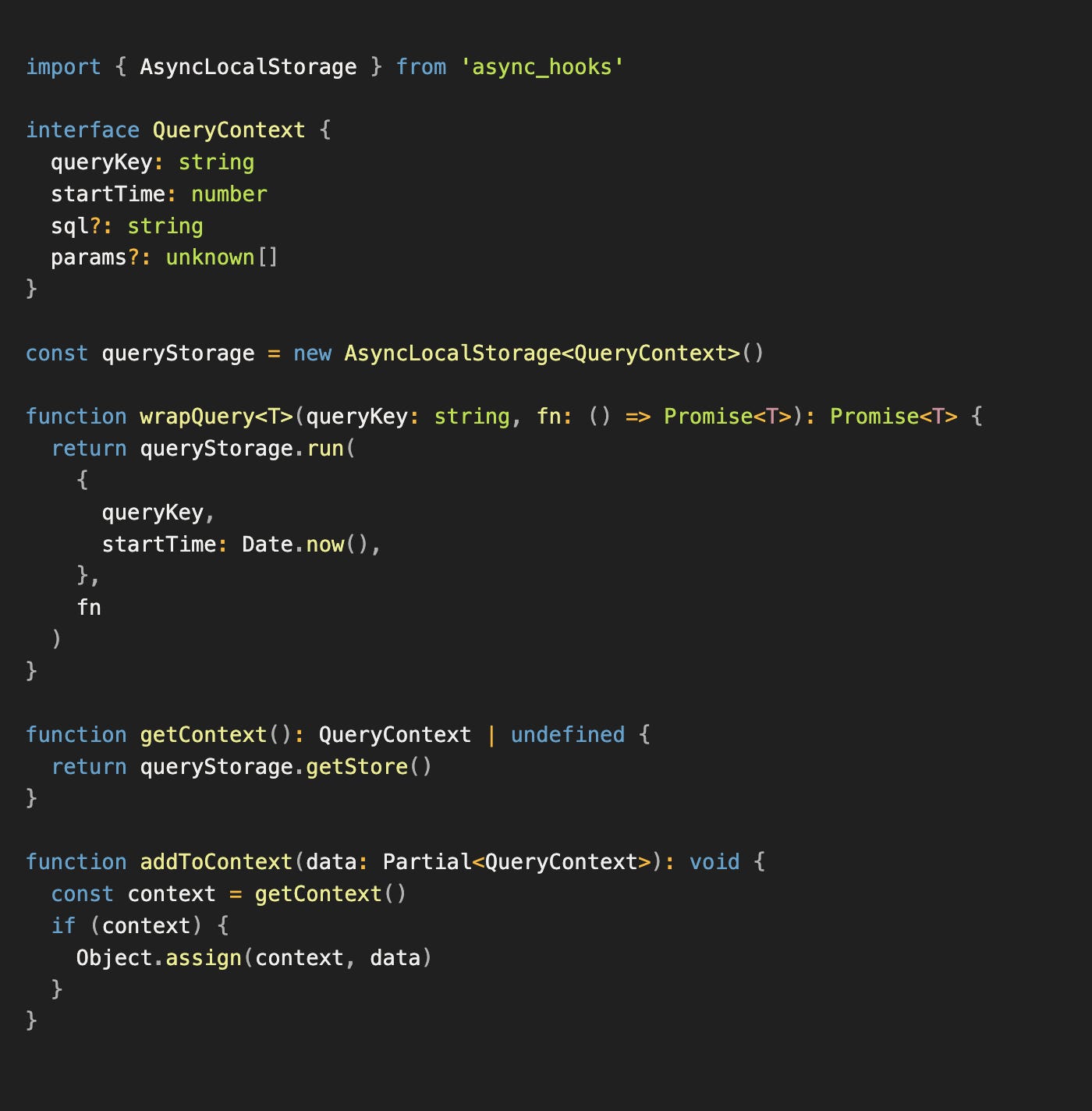
The wrapQuery function creates a new context with initial data (query key and start time) and runs the provided function within that context. Anything called within fn can access or modify this context.
2. Use Drizzle’s logger to capture query details
Drizzle’s custom logger runs before query execution. We use it to push query details into the context we created:
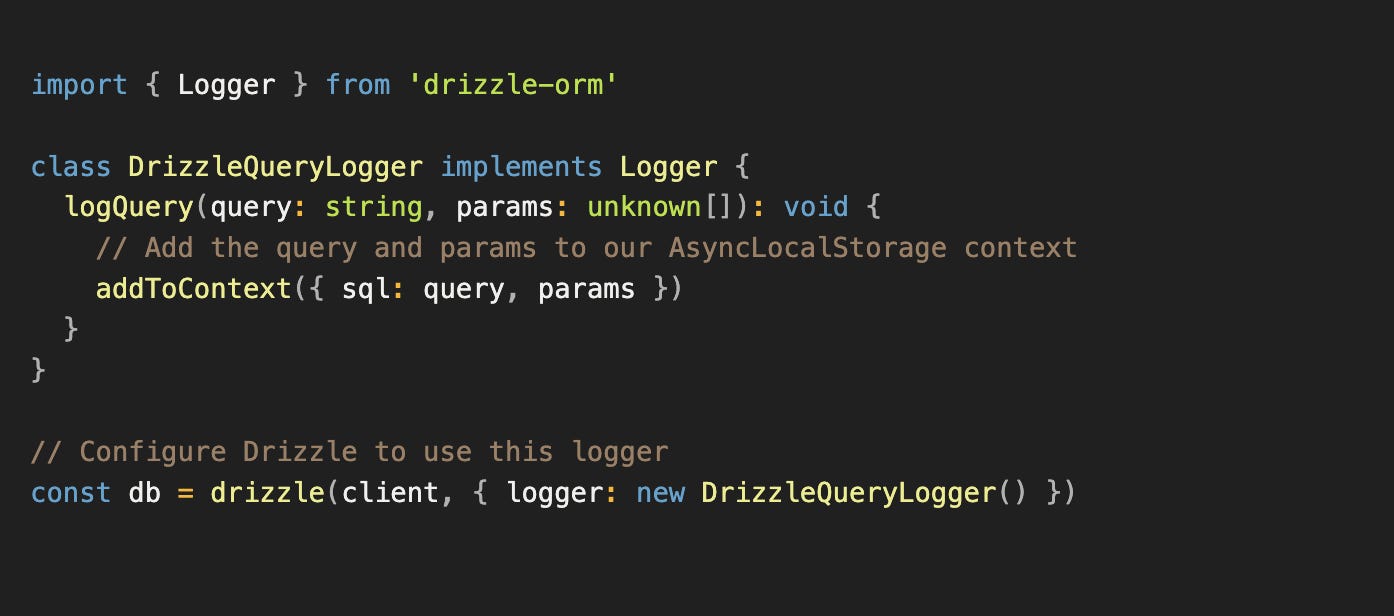
Now when Drizzle executes a query and calls our logger, it automatically adds the SQL and parameters to whatever context is currently active.
3. Wrap query execution to complete the log
Finally, wrap Drizzle queries with the context and emit complete log lines:
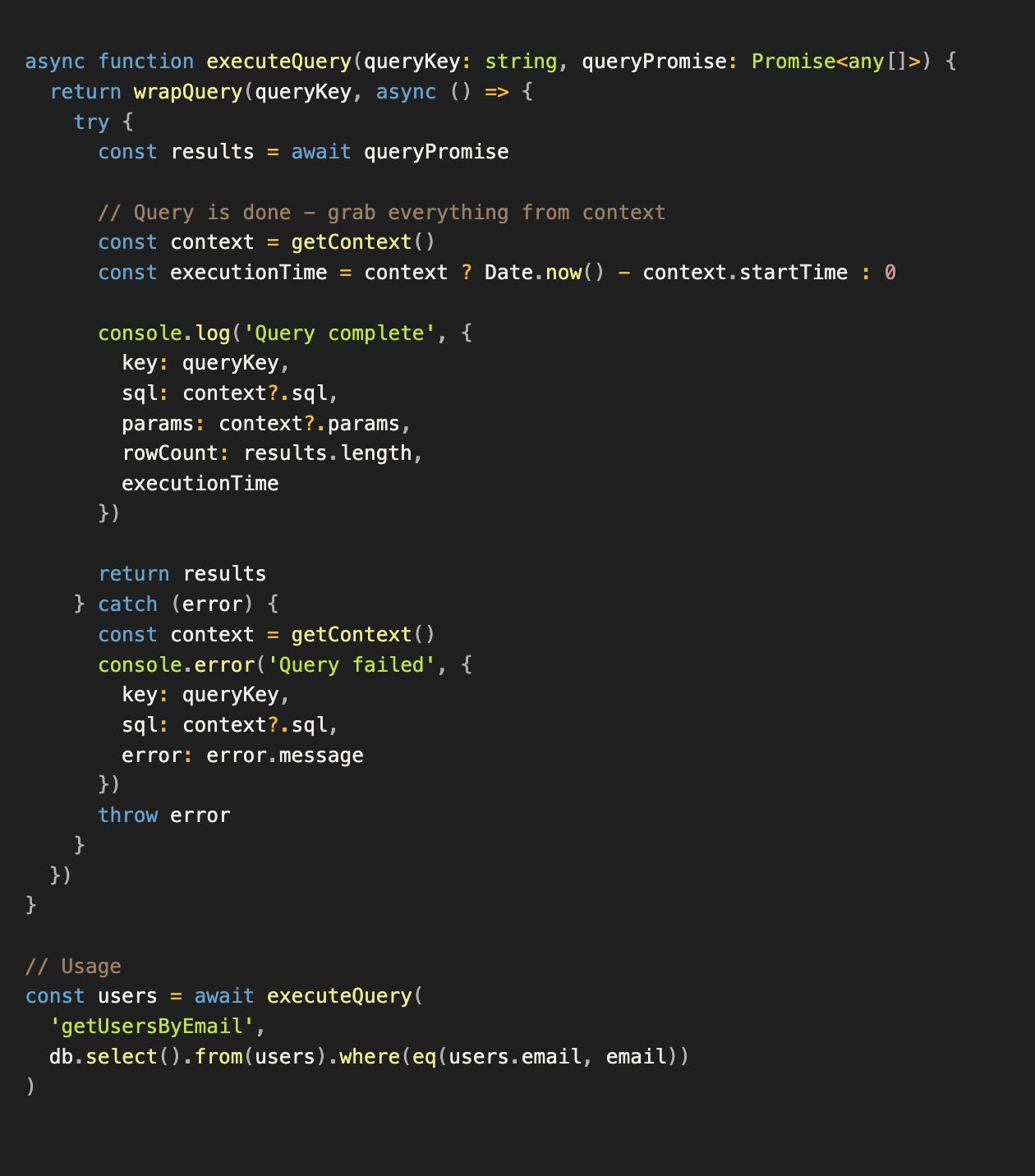
The flow:
wrapQuerycreates a context with the query key and start time.Drizzle executes the query and calls our logger, which adds SQL and params to that context.
Back at the top, we grab the context to get all the pieces and emit a complete log line.
Everything flows through AsyncLocalStorage automatically. No manual context passing, no prototype manipulation, no hooks into library internals.
Conclusion
With this implementation, every database query now produces a complete, structured log line:
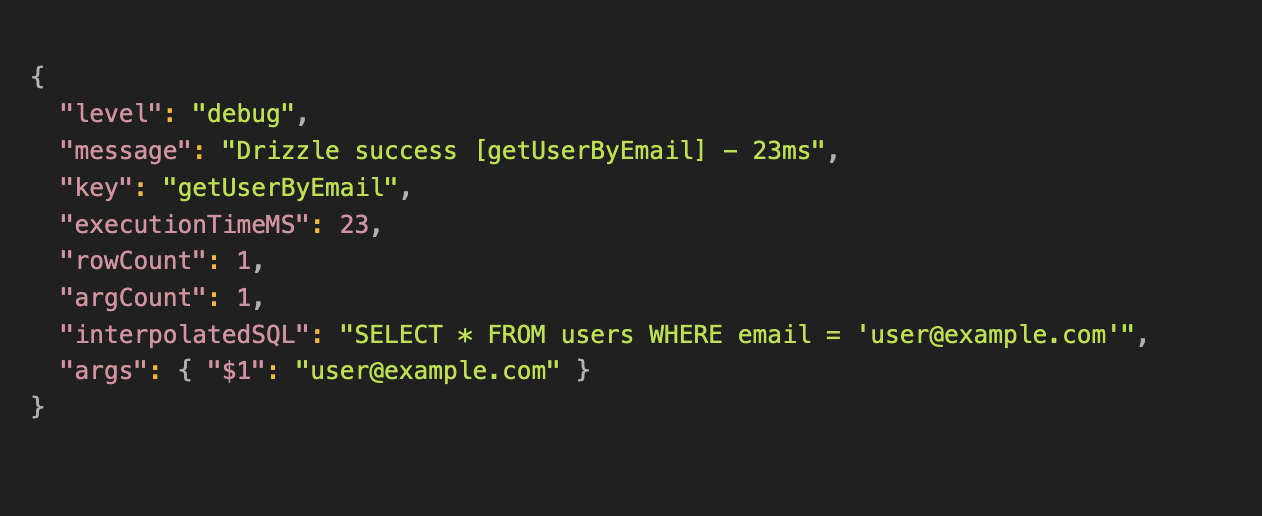
The AsyncLocalStorage approach also gives us type safety and no runtime overhead beyond what we’d already have with any logging solution. Most importantly, we didn’t have to touch JavaScript prototypes or mess with library internals.
The pattern shows up in more places than you’d think. OpenTelemetry uses AsyncLocalStorage for trace propagation. Sentry uses it to maintain error context across async boundaries. A bunch of logging libraries use it to attach request IDs to all logs within a request. Once you know the pattern exists, you start seeing it everywhere. Maybe this will be the blog post that you remember in years once you too have a reason for AsyncLocalStorage!
 | A guest post by
|